Working from home or in the office each comes with its own set of distractions, but your mouse shouldn’t be one of them. A silent mouse lets you click, scroll, and work without the constant tapping sound that can grate on your coworkers’ or housemates’ ears, making it great for shared spaces, gaming, or late-night study sessions.
Our Picks
Bottom Line
Pros & Cons
- Comfortable grip
- Budget friendly
- 18-month battery life
- Ergonomic design
- Only available in black
- Not the slimmest for travel
Bottom Line
Pros & Cons
- 70-day rechargeable battery
- Quick charge feature
- Controls up to three devices at once
- Multiple operating system support
- Right-handed configuration only
- Some might not enjoy the less-clicky design
- Pricey
Bottom Line
Pros & Cons
- Stylish design
- Multiple color options
- Budget friendly
- Travel friendly
- Doesn't feature any contouring
- A bit small for some hands
Bottom Line
Pros & Cons
- Available in small and large sizes, and for left- and right-handed users
- SilentTouch switches are as quiet as they come
- Logi Options+ software lets you program mouse buttons
- Ambidextrous design might take some getting used to
- No USB-C charging
Bottom Line
Pros & Cons
- Multi surface tracking
- Programmable buttons
- Rechargeable battery
- Up to 4,000 dpi sensor resolution
- Removable wrist support
- Pricier
- Only available in black
Bottom Line
Bottom Line
Bottom Line
Bottom Line
From stylish picks to ergonomic and budget-friendly options, we’ve tested the best silent mouse options to help you find the best distraction-free setup.
What’s the best silent mouse right now?
We surveyed the market and tested some of the best silent mice you can buy that can help you get the job done. Our top pick for the best silent mouse overall is the HP 280 for its budget price, ergonomic design, long-lasting battery, and compatibility with multiple operating systems. See how our other top picks compare to the HP 280 below, and find a quiet-clicking option perfect for your work and entertainment needs.
The best silent mouse of 2026

Kayla Solino/ZDNET
Best silent mouse overall
HP 280
Pros & Cons
- Comfortable grip
- Budget friendly
- 18-month battery life
- Ergonomic design
- Only available in black
- Not the slimmest for travel
Get it now
Expert Take
Over the last several months, I’ve been testing several silent mice, and found the HP 280 to be my ultimate pick for a myriad of reasons.
The HP 280 is super affordable at just $25, but is designed to offer the comfort of much pricier vertical ergonomic options. I have long fingers and a larger hand, so I tend to prefer mice with a little more wrist support and a dedicated grip. The 280 features both and is one of the comfiest I’ve worked with in the budget range. And even though the 280 is on the smaller side, I personally feel like the ergonomic design balances out the size.
Internally, it offers multisurface tracking, a sensor resolution of up to 1,200 DPI, optical sensors, an integrated scroll wheel, and 18 months of battery life. One of the biggest drawbacks to this mouse is that it isn’t rechargeable, especially when competitor options like the Satechi M1 mouse are only $5 more and offer a rechargeable battery. I also wish it came in more fun colors. As someone who works from home often and has spent time curating my desk and working area to fit my aesthetic and needs, it’s a bummer that this mouse isn’t available in even a white color to better match my look.
This mouse was easy to set up, even with my work Mac. It works smoothly and quickly and is quiet — definitely quieter than other options I have tested, like my own Logitech Pebble mouse. I have found myself reaching for this over the HP 925 vertical mouse, especially for on-the-go work or moving around the house. However, if you need an ultraportable mouse, there are definitely slimmer options to consider.
HP 280 buyers on the HP website said they liked the quietness, how easy it was to set up, and the value of the mouse. However, some said it had an uncomfortable grip depending on your hand size.
HP 280 tech features: Multisurface tracking | Up to 1,200 DPI sensor resolution | 18-month battery life | Integrated scroll wheel | Optical sensor

June Wan/ZDNET
Best splurge silent mouse
Logitech MX Master 3S
Pros & Cons
- 70-day rechargeable battery
- Quick charge feature
- Controls up to three devices at once
- Multiple operating system support
- Right-handed configuration only
- Some might not enjoy the less-clicky design
- Pricey
Get it now
Expert Take
The Logitech MX Master 3S is superb, but it’s pricey. It features button switches that produce 90% less noise than previous models, so you can work all day without bothering any sensitive ears. It also features a high-performance electromagnetic scroll wheel that provides speedy scrubbing and precision. This versatility makes the wheel useful, whether moving through large spreadsheets or proofing documents line-by-line. The Logi Options+ app lets you customize the seven-button input layout and set up gesture-based inputs for quickly switching programs or controlling two computers simultaneously.
Review: Logitech MX Master 3S
The integrated rechargeable battery provides up to 70 days of use on a full charge, and just a minute of charging gives you three hours of battery life — handy for when you need to quickly top up your mouse battery before a meeting or presentation. It includes Bluetooth connectivity and the Logi Bolt USB receiver, which can connect up to three devices simultaneously. With up to 8,000 DPI sensitivity, the MX Master 3S is highly responsive to your fast inputs. The MX Master 3S also supports various operating systems, making it compatible with Windows, macOS, ChromeOS, and Linux computers.
Verified customers on Amazon like the mouse’s ease of use, comfort, and scrolling speed, as well as its easy programmability. However, customers have mixed opinions on the lag, button functionality, and value.
Logitech MX Master 3S tech features: 70 days of use on a full charge | 90% quieter than previous models | Programmable input buttons
Kayla Solino/ZDNET
Best silent mouse for style
Satechi M1
Pros & Cons
- Stylish design
- Multiple color options
- Budget friendly
- Travel friendly
- Doesn't feature any contouring
- A bit small for some hands
Get it now
Expert Take
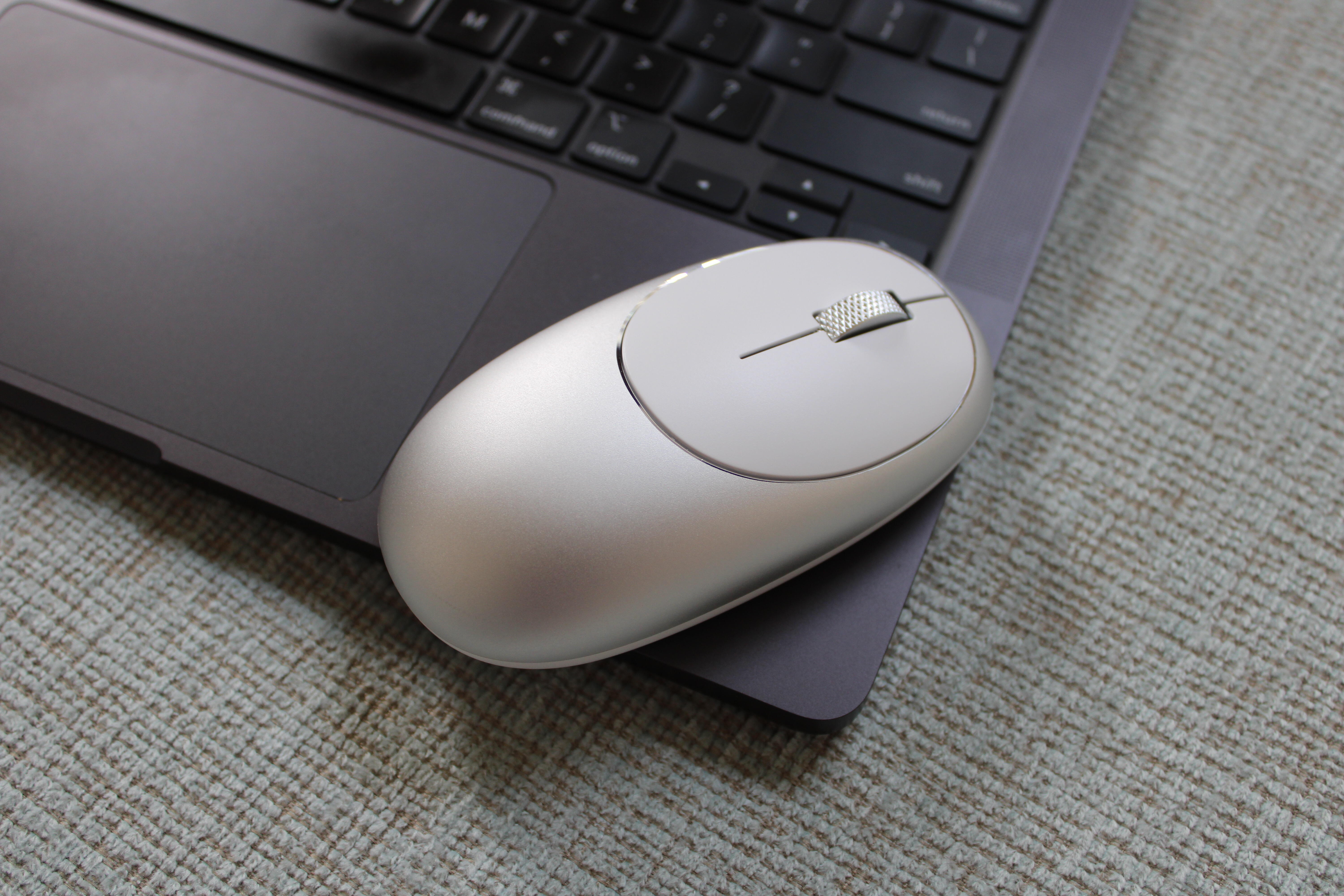
The Satechi M1 mouse is affordable at $30 and comes in the most color options out of any other pick on this list, which is important to me as someone who loves an office aesthetic.
When I tested the M1 mouse, I was impressed with how easily it paired with my work laptop — a MacBook Air, and my personal laptop — an HP. There is no lag, it moves quickly, and is sleek and stylish. It brings an elevated polish to the mouse world that’s desperately needed among competitors.
This model is pretty comparable to the HP 280 and other options I’ve tried from Logitech, and it especially reminded me of my personal Logitech Pebble M350 mouse, which I really enjoy. I do think that the Satechi M1 is slightly small for my hand, which may be a potential issue if you have larger hands and digits. But overall, I enjoyed that it’s functional, stylish, and very affordable. It really does look great with Apple products.
Satechi M1 buyers said they liked the overall design, build, and function of the M1 wireless mouse, with many lauding the battery life, quality, and overall look. However, some said that the mouse was a little on the smaller side for their hand size.
Satechi M1 tech features: Rechargeable battery | Ergonomic design | Five color options | Scroll wheel | Bluetooth connectivity | Optical sensors

June Wan/ZDNET
Best silent mouse for left-handed users
Logitech Signature M650
Pros & Cons
- Available in small and large sizes, and for left- and right-handed users
- SilentTouch switches are as quiet as they come
- Logi Options+ software lets you program mouse buttons
- Ambidextrous design might take some getting used to
- No USB-C charging
Get it now
Expert Take
Silent mice are often smaller in size compared to conventional office peripherals. While this generally results in a more compact and sound-proof design, it doesn’t help in the comfort department for those with larger hands. That’s where the Logitech Signature M650 comes into play.
Review: Logitech Signature M650
The Signature M650 has four varieties: small and large sizes and left- and right-handed variants. We’ve been testing the mouse since its launch and found the design and ergonomics exceptionally comfortable. Plus, the SilentTouch switches live up to their name, as we found them nearly inaudible during our hands-on use. This mouse connects via Bluetooth or the included Logi Bolt USB receiver and uses a single AA battery.
Logitech M650 users on Reddit said they liked the multiple configurations offered, as well as the fair price. However, some Redditors said their mouse functions slowly degraded over time and that they experienced lagging and cursor issues.
Logitech Signature M650 tech features: Ambidextrous design | Battery lasts 24 months | Programmable mouse buttons

Kayla Solino/ZDNET
Best vertical ergonomic silent mouse
HP 925 Vertical
Pros & Cons
- Multi surface tracking
- Programmable buttons
- Rechargeable battery
- Up to 4,000 dpi sensor resolution
- Removable wrist support
- Pricier
- Only available in black
Get it now
Expert Take
HP’s 925 ergonomic vertical mouse adds extra comfort and maximum function to your daily work. HP says it’s designed “to keep your hand in a more relaxed, natural upright position as you click, drag, and scroll through your day.” It includes a detachable wrist rest and is not battery-operated but rather rechargeable. One minute of charging will get you three hours of use, and one charge should last up to four months. It features multisurface tracking, has a sensor resolution of up to 4,000 DPI, and has five programable buttons.
I’ve been using the 925 for several weeks and am impressed with the connectivity, ease of use, and decreased strain on my wrist thanks to this ergonomic mouse. It was easy to set up and integrate with my work MacBook Air because it comes with a dongle and a handy storage place. I was thoroughly surprised by how much I liked the vertical design. Despite the added comfort, it’s worth noting that there’s certainly a bit of a learning curve if you’re upgrading from a basic wireless mouse, and for $100, this isn’t exactly a cheap investment.
If you frequently work from home like me, or work long hours at the computer, I can see the value of a mouse with more wrist support. But if you’re an infrequent mouse user or only need something here and there, I wouldn’t recommend splashing out on a top option like this. You’re better off with a more affordable yet still functional option, like the HP 280 or Satechi M1.
HP 925 users on Reddit compared it to Logitech’s MX Vertical mouse and said they liked the curvier design, button placement, and overall grip of the HP mouse. Many said they swapped their Logitech MX for the HP 925 following dissatisfaction with long-term quality and button placement.
HP 9925 Vertical Ergonomic Mouse tech features: Multisurface tracking | Five programmable buttons | Rechargeable Li-ion battery | Vertical, ergonomic design
What is the best silent mouse?
The best silent mouse is the HP 280 mouse, chosen for its affordability, compatibility with multiple operating systems, and comfortable design. This table can help you compare the best silent mouse options based on pricing, availability of use, and battery life.
| Best silent mouse | Price | Battery capacity | Ambidextrous design? |
|---|---|---|---|
| HP 280 | $28 | 18 months with one AA battery | Right-hand only |
| Logitech MX Master 3S | $110 | 70 days between charge | Right-hand only |
| Satechi M1 | $25 | 45 days between charge | Yes |
| Logitech Signature M650 | $50 | 24 months with one AA battery | Yes |
| HP 925 Vertical | $64 | Up to four months on one charge | Right-hand only |
Prices listed are the MSRP at the time of writing. Please note that prices may vary based on retailer and available promotions, sales, or discounts.
Which is the right silent mouse for you?
To find the best silent mouse, ask yourself two questions: What functionality do you seek in a mouse, and how much money are you willing to spend? If you seek a silent mouse with extra conveniences, the Logitech MX Master 3S and HP 925 Vertical are your best options. They’re pricier than others on this list, but they offer the most for the price. If you’re shopping on a budget, consider our budget picks, the Satechi M1, HP 280, and Logitech M650 — all of which are excellent silent mice.
| Choose this silent mouse… | If you want… |
|---|---|
| HP 280 | The best overall mouse that’s a budget sleeper pick. |
| Logitech MX Master 3S | A pricier, top-of-the-line mouse packed with features. |
| Satechi M1 | A sleek yet affordable mouse for ambidextrous use. |
| Logitech Signature M650 | ZDNET’s pick for best for left-handed users. |
| HP 925 Vertical | A splurge vertical ergonomic mouse designed for comfort. |
Factors to consider when choosing a silent mouse
We recommend keeping the following factors in mind while searching for the perfect mouse for your needs:
- Feedback: Take advantage of crowdsourced feedback and reviews from buyers across various retailer websites and platforms like Reddit to help you pinpoint what real people think about particular mice.
- Noise: Consider where you will use the mouse and how much noise it may produce. Each mouse on this list produces little to no noise per click. More importantly, each mouse on this list caters to a specific type of user. If you don’t care much about the noise factor, you can broaden your search to include a wider range of mouse options.
- Price: Whether you have an expense account or you’re shopping on a budget, there’s an ideal recommendation for everyone. Like any purchase, it’s important to set a spending limit that you’re comfortable with. Not only will this help you narrow your search parameters, but you’ll also feel better knowing your final choice fits your budget. Remember, you don’t always have to spend a ton to find a great product.
FAQ
How did we choose these silent mice?
ZDNET expert-researched or went hands-on with most of the silent mice on this list. We use these mice during our daily work and entertainment activities to test out noise level, function, comfort, and more — not just for a day or two, but over a few weeks to get a feel for a product’s add-in value. Can you “add” this product into your life and benefit from its presence, or is it just another fad product that’s too good to be true or collects dust after the buzz wears off?
If we think another product is worth your money, we’ll update this list or write a spotlight review highlighting its best qualities and specifying who it’s for. We also routinely scour the web for new products worthy of testing, follow news on product rollouts and upgrades, and source the best deals.
What’s the advantage of a silent mouse?
If you’re already eyeing a silent mouse, it’s easy to justify buying one. But for those who are on the fence or unsure of its applicability, here’s our lowdown.
The biggest selling point of a silent mouse is its noiseless design. If you’ve ever gamed at night or used a computer in a public library, you may know how loud and distracting a clicky mouse can sound. That silent mice are indeed silent benefits both you and those around you. Less noise means fewer distractions, making it easier for you to focus on your task at hand.
How is a silent mouse so quiet?
Some people can condition their hearing to drown out the mouse-clicking sound. You may not even find it distracting — and that’s normal. So, when using a silent mouse for the first time, it’s easy to feel bewildered by the mute feedback.
How do these mice operate in a cone of silence? Manufacturers apply a blend of materials and cushioning to dampen the sound when you press a mouse button. This design approach helps mitigate or eliminate the clickety-clack of traditional computer mice.
Is there a way to make your current mouse quieter?
There are a couple of ways to dampen the sound of a nonsilent mouse, but they aren’t completely effective at blocking out the noise. One option is to use a thick foam mouse pad. This is especially helpful if you use your mouse on a hard surface, like a wooden or metal desk.
Another trick, which requires a little more DIY, is to disassemble the outer cover, or shell, of your mouse and insulate the click switches with thin foam.
Is a silent mouse good for gaming?
A silent mouse can be a good option for gamers. The Razer Pro Click Mini has seven programmable buttons to customize your layout for your favorite games and an optical sensor with a maximum sensitivity of 12,000 DPI.
With Razer HyperSpeed Wireless or Bluetooth connectivity and the ability to run on one or two AA batteries, you’ll have more control over how your mouse interacts with your computer and how to power it when batteries are scarce.
What is a silent mouse?
A silent mouse is a computer mouse that uses soft rubber dampers on its button switches to cushion them and reduce noise. While it doesn’t make the switches completely silent, it significantly reduces the noise your mouse makes when you click a button.
Silent mice are perfect for shared workspaces where noise can distract or annoy coworkers. They are also easier to click, making them more comfortable and ergonomic to use. This reduces strain on your hand and wrist while you work.
What types of silent mouse options are there?
Silent mice come in many shapes and sizes, but the most popular tend to be wireless. These wireless silent mice are either charged via a cable or powered by batteries.
Beyond battery-operated or not, wireless mice are available in several common designs: traditional, vertical, or left-handed, to name a few. Vertical mice offer more ergonomic designs and customizable button options, while traditional mice feature a horizontal layout and can range from basic to customizable. You can also find wireless mouse options for tablet devices like iPads, too.
Latest updates
- September: Verified our recommendations are all available and still represent the best picks on the market. Made small edits for clarity.
Are there alternative silent mice worth considering?
We selected these best options based on functionality, budget, and other factors. However, there are other quality silent mice on the market. Here are a few.

Kayla Solino/ZDNET
Logitech Pebble Mouse 2 M350s
The Pebble Mouse 2 M350s improves upon its predecessor by increasing the battery life from 18 to 24 months on a single AA battery. Like the prior version, it has a flatter surface than most mice, which makes it ideal if you use a fingertip grip (only using your fingertips to move the mouse) or find the typical mouse contour too extreme for your hand. I loved using the similarly designed first-gen Pebble Mouse M350 in my everyday work-from-home setup.
The Pebble Mouse 2 M350s is incredibly lightweight, making it excellent for hybrid workers or people who travel frequently. It has a customizable button allowing you to add shortcuts for your favorite apps, and uses Bluetooth to allow you to switch between three separate devices.

Logitech/ZDNET
Logitech Pebble i345 Portable Wireless Mouse
This slim, lightweight Logitech mouse packs many of the same features as the M350s model, though this one is designed specifically for simple compatibility with the iPad. Like other mice on our list, it works on multiple devices and connects with energy-efficient Bluetooth. It also touts 18 months of battery life and a wireless range of 10m.

Tecknet/ZDNET
TeckNet 2.4G Mouse
This TeckNet mouse earned 4.4 out of 5 stars on Amazon with over 8,000 reviews. It’s available in five colors and is rechargeable, soundless, and wireless. The vertical mouse reduces shoulder and neck strain and fully charges in 1.5 hours for up to two months.
The mouse also features an automatic sleep mode that kicks in after eight minutes of inactivity, and its adjustable five-step 4,800 DPI ensures enhanced sensitivity to guarantee precision on a myriad of surfaces. Its lack of lag and professional-grade responsiveness make this a great option for graphic designers and office workers alike.

Logitech/ZDNET
Logitech M330 Silent Plus
The venerable Logitech M330 has long been the go-to silent mouse for many, notching a near five-star rating on Amazon among over 23,000 reviewers. The mouse is small but mighty, featuring an 18-month battery life, a 2.4GHz receiver for multidevice compatibility, and silent operation.
This silent wireless mouse has a bargain price compared to programmable buttons and a higher sensitivity of 1,000 DPI. It’s compatible with a PC, Mac, laptop, or Chromebook and is available in black and gray. It’s got a wireless range of up to 10 meters and is made from certified postconsumer recycled plastic.
For more on computer mice, check out our articles on our expert’s portable workstation, the best wireless mice of 2026, and the wristband that can turn your hand into a computer mouse.