Repository navigation
Announcements (maybe blog is more accurate) #142
Description
Activity
New use pattern - Element lookup using Keys
keyscan be used to lookup Elements. As a result, all Elements are capable of having a key, including non-output elements such as a Text Element.To get an element object from a form, you call
form.FindElement(key)This is the new, preferred method for doing Updates on elements.
Previously if you wanted to output something to a Text Element, you needed to create the text element outside of the form layout and keep that text element variable around so you can call
text_element. Update('new text')The new design pattern is thus:
In your form layout, include a key on your Element:layout = [[sg.Text('My text', key='text')]]Later in your code you can update this Text Element by making this call, assuming the variable form is your FlexForm object:
form.FindElement('text').Update('new text')The Demo programs have all been updated to use this new technique. This capability and its impact on the length of programs led to pushing version 2.30 out the door quickly.
Borderless Windows are Here
Try them on your next form.
Add this to your FlexForm call:
no_titlebar = TrueYou can expect to see some of these in the Demo programs.

You can click anywhere on the window and drag to move it. Don't forget to put an exit key on these windows.
Be sure and make an "exit" button or you'll be running task manager to close your windows. The reason is the when you turn on this option, you will not see an icon on your taskbar for the window. This happens on both Windows and Linux. Thus, if you do not supply an exit button, the user will have no means to close the window.
Reacted by FlintRiverGrab Anywhere
Tonight's change is perhaps going to be a really cool thing or one that is going to piss people off.
But, hey, I like it this way. If you don't, set
grab_anywhere = Falsein your call to FlexForm.As the name implies, you can grab and drag your window using any point on the window, not just the title bar. I was only enabling this when the title bar was turned off. I think it's a much superior way to interact with a window.
FlexForm is becoming quite the call!
def __init__(self, title, default_element_size=DEFAULT_ELEMENT_SIZE, default_button_element_size = (None, None), auto_size_text=None, auto_size_buttons=None, scale=(None, None), location=(None, None), button_color=None, font=None, progress_bar_color=(None, None), background_color=None, is_tabbed_form=False, border_depth=None, auto_close=False, auto_close_duration=DEFAULT_AUTOCLOSE_TIME, icon=DEFAULT_WINDOW_ICON, return_keyboard_events=False, use_default_focus=True, text_justification=None, no_titlebar=False, grab_anywhere=True):So, enjoy a lazy way of interacting with windows on me.
You will want to turn if off for forms with a SLIDER. you need the slider to move, not the window. I'll update the Demos that use sliders to turn off the grab_anywhere.
Tables
This one has been requested a number of times. Rather than make a Table Element, decided to see if the current PySimpleGUI is capable of making nice tables using standard Elements. The answer seems to be yes, it's possible with existing Elements. The key was to enable text justification in the InputText element. By right justifying the text in those Elements, it's possible to create a nice looking table.
Here's an example using a ComboBox and Input Elements.

You'll find the code that generated the table in the file Demo_Table_Simulation.py. It requires the latest PySimpleGUI from GitHub in order to use the justification setting.
This is a "live keyboard" demo. It updates the table values as you are typing.
There are 3 fields at the top of the table. If you enter a value into the 3rd field, the cell that the other 2 cells represents will be changed to that value. Enter 1, 2, 1234 and cell (1,2) will be changed to 1234.
There is a new trick demonstrated in this demo that shows off the power of Python. Rather than pass in a string as the key to the Input Elements, I passed a tuple. Nothing about the key requires it to be a string. The only requirement is that you use the same type to look up the element when you call FindElement or use the key to read the return values.
This is the code that makes the Input Elements:
    for i in range(20):
        inputs = [sg.In('{}{}'.format(i,j), size=(8, 1), pad=(1, 1), justification='right', key=(i,j), do_not_clear=True) for j in range(10)]
See how the key is set to (i,j). This allow me to easily find the Element that is represented by (i,j) later. What to access the cell at (0,0)? This you would make this call:
form.FindElement((0,0))Hopefully this is enough capability for the folks that need tables in their forms/window.
Three Point Oh!
So maybe I kinda screwed up the numbering when the last one became 2.30. I didn't think about it looking like 2.3 also. Doh!
There have been a lot of changes lately so perhaps it's time for a major bump.
It's a clean slate
keep_on_top = TrueWhat might this setting do in a call to FlexForm? If you guessed create a window that's ways on top you're right.
This one little flag enables cool floating toolbars that stay on top of all of your other windows. I'll admit a large portion of this project is for selfish purposes, that I have a platform to develop tools on top of.
Now I've got this nifty toolbar on the top part of my screen, always ready to launch or do something.

3.0.2 release today to turn off the grab_anywhere feature for non-blocking forms. tkinter is printing out a warning/error message when the form is closed using a button. Doesn't appear to have any effect on the overall functioning, but it's distressing to see. Better to disable this feature for now.
Plan is to add back an override mechanism should a user want it.
RELEASED 3.0.2
Floating Toolbar - New demo program
This is an always-on-top, compact floating toolbar. They are super-handy to leave running. Something satisfying about writing code that then gets used often, especially if they make you much more efficient.
Async Forms
Updated the Readme / primary doc to discuss the use of non-block forms.
As explained in the documentation there are a number of techniques to move away from async forms including using the
change_submits = Trueparameter for elements andreturn_keyboard_events = TrueFloating Desktop Widgets
I've discovered that in about 30 lines of code you can create a floating desktop widget.

If you click the pause button, it switches to Run.

This "Widget" is always on top of the other windows.
Looking for a way of launching these in a way that have no taskbar icons. If launched from PyCharm it behaves this way. If launched from a Toolbar, the toolbar's window is attached to the timer. Close it and the timer closes.
This demo is the first time I've ever combined a ReadNonBlocking with a Read in the same form. The reason for using it in this program is that while the timer is paused, there' s nothing happening so why have the program running the loop when it can wait for the user to do something like click a button. When the button is clicked we return from the Read call.
Thank you to jfong for sending an interesting version of this program. His ideas have rolled into a into the project code many times.
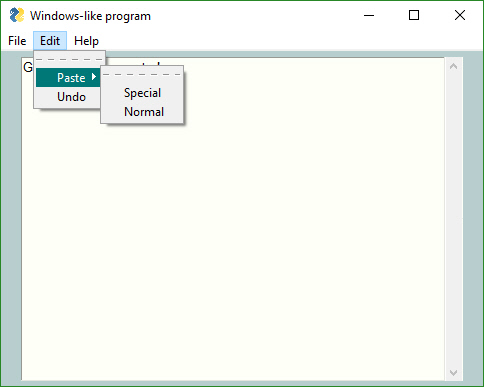
Menus are done
The last of the big features, Menus, was just released to GitHub. With it comes the ability to get the look and feel of a windows program. I don't know if the architecture will lend itself to being used this way or not, but it did seem like a useful feature to add..
 Reacted by Jonathan D Kelley, Alejandro Casanovas and Grinch_
3.7 Support
Thanks to @mrstephenneal we can now say that PySimpleGUI works on Python 3.7. There was a button issue causing trouble. Looks like it's fixed now so I think 3.7 is now safe to with PSG.
Release 3.01.00
Menus! (and a Listbox.Update bug) are the big features.
Since the Menu code is somewhat isolated, and I want to get some users on it, decided to go ahead and push it all out there in 3.01.00
I didn't mention this in the readme section on menus, but by default (you can't currently turn it off) menus are detachable. If you double-click the dashed line then you get a floating version of that menu. Should make for some pretty interesting user interfaces?

1300 remaining items
Element Keys
Lately I've been trying out a new coding convention for element keys. I normally use and recommended a string with the format
'-KEY-'. While these strings stand out when looking at source code, they can be tedious to initially implement. Instead of a hard coded string, I'm using "constant" variables (all upper case) with the formatK_KEY. The benefit when creating the code is significantly better because auto-complete is available for the keys.For the launcher application I mentioned recently and showed this settings window, it was necessary to generate a lot of keys for a repeated layout construct. This is the settings window:

Within each entry, there are 7 elements that need unique keys. I accomplished this using lambda functions for the same key name format.
K_BLOCK = lambda num: f'-BLOCK{num:03}-'
K_ICON64 = lambda num:  f'-ICON64{num:03}-'                                    #   ░█░█░█▀▀░█░█░█▀▀
K_ICON = lambda num: f'-ICON{num:03}-'                                         #   ░█▀▄░█▀▀░░█░░▀▀█
K_NAME = lambda num:  f'-NAME{num:03}-'                                        #   ░▀░▀░▀▀▀░░▀░░▀▀▀
K_PATH = lambda num: f'-PATH{num:03}-'
K_FRAME = lambda num:  f'-FRAME{num:03}-'
K_DEL = lambda num: f'-DEL{num:03}-'
K_CBOX = lambda num: f'-CBOX{num:03}-'
Here's the trash can's element:
sg.Button(image_source=trash, mouseover_image_source=trash_red, button_color=f'red on {sg.theme_background_color()}', border_width=0, key=K_DEL(block_num))
The key is specified as
K_DEL(block_num)whereblock_numis a unique integer.PEP discourages using lambdas in this way (it's an anti-pattern), but I'm a fan of anti-patterns if used responsibly. Here's a traditional function definition for the
K_DELkey. I suppose it too is discouraged in this way since it violates the PEP8 naming convention. I like seeing these as UPPER CASE since most of the time they'll be constant strings. SeeingK_XXXXin the code makes it easy to see it's a key.def K_DEL(num): return f'-DEL{num:03}-'
I'm been watching the Inteltly.io YouTube channel recently and saw his video on lambdas. He's a much more experienced Python developer than I am and insists on using type checking everywhere so he's disciplined and writes clean code. He mentioned turning off the PEP warning for this use of lambdas in his editor.
I may refactor these keys in the launcher application. It would have made a lot more sense and made parsing keys to get the block number trivial if I had used tuples instead of strings. For example:
K_DEL = '-DELETE-'                              # Fixed part of key for block deletes
K_B_DEL = lambda num: (K_DEL, num)              # Block delete key
Then in the event loop it's easy to check for the DELETE event as well as getting the block number.
if event[0] == K_DEL:
    block_to_delete = event[1]
The nice thing about tuple keys is that the event loop can mix checks for strings and tuples without having to explicitly check the type. If the event is a string,
event[0]will be the first char of the string. The if will not be True and won't cause any type problems like mixing strings and ints can cause.You do need to be careful mixing tuple and string if you're using the
startswithorendswithstring method as they assert when attempted on a tuple. Put your tests for tuples at the top of the loop, strings at the bottom.One small problem with using tuples as keys...
... they don't work so well as a key in JSON files... they don't work at all as keys in JSON, unlike Python.

So, another feature extension....
It's possible to do using the existing User Settings API calls, but requires manually changing the key when calling get/set. I had run into this in the past because tuples are used as keys for some of the PySimpleGUI global settings. I forgot about the limitation until I tried it earlier today. They way I got around it previously was to serialize the tuple into a string that is then used as the key.
The
settingparameter I mentioned several posts back uses the same key that the element uses when read/writing to the settings JSON file. The change I checked in this morning (version 6.2.40) was to the User Settings calls enabling tuples as keys to be saved/loaded.With this change, I was able to convert my keys from
textK_NAME = lambda num: f'-NAME{num:03}-' K_PATH = lambda num: f'-PATH{num:03}-'
to
tupleK_NAME = '-NAME-' K_B_NAME = lambda num: (K_NAME, num) K_PATH = '-PATH-' K_B_PATH = lambda num: (K_PATH, num)
which enabled me to write each of the saved fields into the JSON file for this app.

6.3 Release Feature Narrowing
I really want to get version 6.3 wrapped up and posted to PyPI. Changes have been piling up for the past 6 weeks, some of which I'm feeling a little nervous about. I've decided to pause the clickable Columns & Frames and element deletion for the release. There is going to be a lot of code changes for both of those features.
Changelog
If you've not seen the PySimpleGUI.py file, there's a changelog at the top of the file that chronicles the changes made since the last PyPI release. One place you can see the log is in
psgmain.exeorpsgupgrade.exe. The "Upgrade to Maintenance Release" window has a button that shows the release notes (the changelog).
Here is the log that shows the changes (roughly) made between 6.2 and 6.2.41.
6.2 14-Jun-2026 released to GitHub 6.2.1 22-Jun-2026 Added new feature - mouseover images for Buttons 6.2.2 22-Jun-2026 Added mouseover_image_source to Button.update 6.2.3 23-Jun-2026 Fixed overwriting the original image_source when Button.update called Added ability to add a mouseover image after window is created 6.2.4 23-Jun-2026 A bunch of refactoring of the Button.update and mouseover methods. Removed the hacky feeling do_not_save_image parameter from Button.update Refactor was to pull out Button image manipulation into a couple of methods. Also fixed a few bugs in the same areas. 6.2.5 24-Jun-2026 Fix in Button.update. Wasn't setting the image correctly and also wasn't saving the subsample,etc. 6.2.6 26-Jun-2026 New Listbox method - get_active_index. Returns the index of where the cursor is located. 6.2.7 26-Jun-2026 Two Window location changes to make centering Windows on top of each or centering on any point easier Added return_center parm to Window.current_location. If True, will return the center of the window rather than upper corner Added center_on_location parm to Window. If True, then the Window will be created with the center of the window located at the location parm 6.2.8 27-Jun-2026 Changed the center_on_location feature into a more generalized location_anchor. Can specify which part of the window should be located at location when creating. Also changed Window.current_location. Added parm anchor_location to specify a specific anchor point's location to be returned 6.2.9 27-Jun-2026 Bug fix in Window.settings_restore. If a value was not yet set for an element, then should save the setting that was specified in the element in the layout Was setting to '' previously. 6.2.10 29-Jun-2026 Added mouseover image to Image Element. Used same technique as the Button element. Refactored some of the Button mouseover code and put into Element object. 6.2.11 29-Jun-2026 Begin working on Mouseover Images for Tabs 6.2.12 3-Jul-2026 Added use_min_size parm to Window object. Setting to True will cause the window's minimum size to be set when Window created 6.2.13 4-Jul-2026 Added automatic key creation for non-Input elements. All Input-style elements get a key automatically assigned if one is not provided. Other static elements have no key unless explicitly set. Now all those static elements will get a key with format "KeyID 41B56A4C50" if a key is not specified. Removed dead-code from Window.add_row More code for Tab mouseover images. What's there is not working so shouldn't be trying it out just yet. (I think) I know the approach I need to take. 6.2.14 5-Jul-2026 Added Element.mouseover_image_set so that mouseover images can be removed. Needed because of how update methods handle image deletes (if all parms are None, then the Element image is deleted). Added same image freeing of previous image that was in Image element code when applying images for Button element 6.2.15 6-Jul-2026 Fixed Image.update bug with not updating image 6.2.16 6-Jul-2026 This time actually fixed not updating image bug in Image.update. Renamed image_source member variables to match the other image names 6.2.17 6-Jul-2026 Fixed mouseover image for Image element. Not sure exactly when it broke but had to be recently. 6.2.18 7-Jul-2026 Updated docstring for Column.contents_changed to inform that Window.refresh should be called prior to Column.contents_changed. 6.2.19 7-Jul-2026 Fixed bug 6896 (Tree object has no attribute BType). Needed to check the element type is a Button before checking the type of button 6.2.20 9-Jul-2026 Added placeholder feature to Input element. Still need to make changes to update to enable changing placeholder after initially set 6.2.21 9-Jul-2026 Changed Input.update to trigger a placeholder update anytime the value is changed via update. Important for when a Window.settings_restore call happens 6.2.22 10-Jul-2026 Added placeholder_justification to Input element. The placeholder justification can be different than the normal data. 6.2.23 10-Jul-2026 Added gear and degree symbols. 6.2.24 11-Jul-2026 Added propogate_to_window param to Element. This could go really badly. The right click code is weird and quirky. Hoping this will make it more dynamic 6.2.25 13-Jul-2026 Added Bug fix for applying images via update to Image, Button and Tab elements that was introduced with the mouseover code. 6.2.26 17-Jul-2026 Automatically restart user's program after upgrading to the PySimpleGUI maint release. REALLY hoping I didn't screw this one up since it'll require manually reinstalling most likely 😬. Also adding restarts to applications that are upgrading PySimpleGUI. sg.execute_restart(sys.argv[0]) is the recommended call for users to make to restart. 6.2.27 17-Jul-2026 Added an autoclose popup before the pip restart happens 6.2.28 18-Jul-2026 Added setting element's right click menu definition if the element gets a right click menu through the window's menu definition. This helps with changing right click menus on the fly. 6.2.29 18-Jul-2026 Fixed right click problem of both a window and an element getting the click event. Learned can return 'break' from the element's right click and it will stop propogation of the click to the window 6.2.30 18-Jul-2026 Added location_anchor parameter to all of the popups. 6.2.31 18-Jul-2026 Changed a LOT of docstrings for parms that are location and size type of parameters. Added (None, None) to valid types. Added window_anchor parameter easy_print and the debug window. 6.2.32 19-Jul-2026 Added ⟳ as SYMBOL_REFRESH 6.2.33 19-Jul-2026 Updated Window.move to use anchors when moving. The anchor used when window created can be overridden using anchor parameter FINALLY got the rtype docstring right for Window. __getitem__. It fixed the type warnings and improved the autocomplete 6.2.34 21-Jul-2026 Expanded the set_tooltip method's parameters to include the text/background colors, tooltip time, tooltip offset, skip bind Expanded ToolTip object to include the above parameters 6.2.35 25-Jul-2026 Added border_color parm to the Frame.update method so that the border color can be changed dynamically 6.2.36 25-Jul-2026 Added font parm to element.set_tooltip. Now all aspects of the tooltip are controllable through this interface. 6.2.37 29-Jul-2026 Added 'thickness' paramter to HorizontalSeparator and VerticalSeparator elements. If no thickness is specified, then the current Separator elements are used which as based on TTK Line widgets. If a thickness is specified, then a Frame widget is used to draw the line. The added benefit of this addition is that the color of the Frame based lines will match the color used in Frame Elements. 6.2.38 30-Jul-2026 Added parameters tooltip_text_color, tooltip_background_color, tooltip_font, tooltip_time, tooltip_offset to Window object. Sets the tooltip settings for this window. Once set, an individual element's color, font, etc, can be set using set_tooltip 6.2.39 31-Jul-2026 Fixed Window docstring for tooltip parameters recently added 6.2.40 31-Jul-2026 Native support for tuples in UserSettings files (json). They're now automatically serialized. Converted global settings that were manually serializing into saving the tuples via the settings save. Fixed docstrings for Window tooltips parm 6.2.41 1-Aug-2026 Fixed Graph.draw_arc docstring. It incorrectly stated the available styles. Should have been 'pieslice', 'chord', 'arc' Graph.draw_line - added capstyle which determines how the end of the line should appear Graph.draw_lines - added arrow, arrow_shape, joinstyle, capstype parameters.- changed the title
[-]Announcements[/-][+]Announcements (maybe blog is more accurate)[/+]on Aug 2, 2026 Not quite released yet, but getting close. The call reference documentation has been updated to match version 6.3. Below are the release notes that were also added. Just have to rename some things, run a few more quick tests, label GitHub and upload to PyPI. What could possibly go wrong?
6.3 Released 2-Aug-2026
- Mouseover Image - New feature for Image and Button elements
- Listbox - New method
get_active_index. Returns the index of where the cursor is located. - Window new features and fixes
- Window Anchors
- Window Location Anchor - New location option for creating and getting location for a window. Anchors are specified using these constants:
WIN_ANCHOR_UPPER_LEFT
WIN_ANCHOR_UPPER_RIGHT
WIN_ANCHOR_LOWER_LEFT
WIN_ANCHOR_LOWER_RIGHT
WIN_ANCHOR_CENTER - Added
location_anchorparameter to all the popups. - New
center_on_locationparameter that changes the location within a window to use for initial creation. Default if upper left corner. - Added
window_anchorparameter easy_print and the debug window. - Updated
Window.moveto use anchors when moving. The anchor used when window created can be overridden using anchor parameter
- Window Location Anchor - New location option for creating and getting location for a window. Anchors are specified using these constants:
- New
use_min_sizeboolean parameter - If True and the window is resizable, set the minimum size to the size of window when created - Bug fix in
Window.settings_restore. If a value was not yet set for an element, then should save the setting that was specified - Finally got the rtype docstring right for
Window__getitem__. It fixed the type warnings and improved the autocomplete - Added parameters
tooltip_text_color,tooltip_background_color,tooltip_font,tooltip_time,tooltip_offsettoWindowobject.
- Window Anchors
- Added automatic key creation for non-input element. Input type element already get assigned a unique key if one is not specified. Previously, static elements have no key unless explicitly set (e.g. Text elem). Now all those static elements will get a key with format "KeyID 41B56A4C50" if a key is not specified.
- Fixed bug 6896 (Tree object has no attribute BType). Needed to check the element type is a Button before checking the type of button
- Placeholder - new feature for Input elements. When the input is empty and it doesn't have focus and the mouse is not over it, then a "placeholder" text will be shown in the input area. Considering adding to Combo and other input-style elements.
- Added new symbols:
- SYMBOL_GEAR = '⛭'
- SYMBOL_DEGREE = '°'
- SYMBOL_REFRESH = '⟳'
- Right click menu
- Added propogate_to_window param to Element.set_right_click_menu.
- Fixed right click problem of both a window and an element getting the click event.
- Automatically restart user's program after upgrading to the PySimpleGUI maint release.
- Changed a LOT of docstrings for parms that are location and size type of parameters. Added (None, None) to valid types.
- Expanded the
set_tooltipmethod's parameters to include the text/background colors, tooltip time, tooltip offset, skip bind. ExpandedToolTipobject to include the same parms. - Added border_color parm to the
Frame.updatemethod so that the border color can be changed dynamically - Added font parm to element.set_tooltip. Now all aspects of the tooltip are controllable through this interface.
- Added 'thickness' parameter to HorizontalSeparator and VerticalSeparator elements. If no thickness is specified, then the current Separator elements are used which as based on TTK Line widgets. If a thickness is specified, then a Frame widget is used to draw the line. The added benefit of this addition is that the color of the Frame based lines will match the color used in Frame Elements.
- User Settings - Native support for tuples in UserSettings files (json). They're now automatically serialized.
GraphElement- Fixed
Graph.draw_arcdocstring. It incorrectly stated the available styles. Should have been 'pieslice', 'chord', 'arc' Graph.draw_line- addedcapstylewhich determines how the end of the line should appearGraph.draw_lines- addedarrow,arrow_shape,joinstyle,capstypeparameters.
- Fixed
6.3.x Release
COLOR_SYSTEM_DEFAULTbug (#6902)There needs to be a patch release for 6.3 to fix a COLOR_SYSTEM_DEFAULT bug. I'm finally tackling the problem of having this sentinel in the PySimpleGUI architecture. The number of changes is going to be quite large because there are 100's of calls to tkinter to configure widgets.. Any place where foreground color, background color, etc, can be set needs to get changed.
Regression Test Suite
Given the large number of changes being made for this color bug, I wanted to do some testing that would cover the large number of parameters that each element has, especially the color parameters.
This idea seemed like an ideal tool to experiment with using Claude Sonnet 5 to help write PySimpleGUI programs. It was an iterative process to get to something that was as good or better than I expected (it was better). On the first run it triggered two bugs. That alone seemed like a victory, especially I don't have any automated tests running code being tested.
The nice thing about using PySimpleGUI for all this is that the application is a program with a user interface that's easy to contol.


Window that tests the Text Element.
These example windows differ.


RAM Usage Tagger
I'm temporarily working on a laptop that's struggling to keep up. RAM is the most in-demand resource. I thought it would be helpful to see the amount of RAM each application is using. I started with the Screen Ruler application and modified it to draw a rectangle around each window along with the application's name & amount of RAM being used. I added an auto-refresh feature to enable realtime stats that stick to a window.
Both of these projects have been a positive experience using Claude Sonnet 5. I've stuck with that model.
Window.RAM.Label.mp4
Version 6.3.3 on GitHub
I made some rather sweeping changes to all of the color parameters to tkinter in an attempt to catch as many of the
COLOR_SYSTEM_DEFAULTbugs as possible.
I broke lots of elements, pretty badly, so I had to regroup and back out changes one by one. Hopefully I've kept the parts that fix things and removed all the mistakes.
It was an ideal time to have Automated Regression Tests up and running. I was able to cover the majority of the elements' parameters.
Here's a comparison of 6.3 versus a 6.3.3 run I did this afternoon. The failures for the Window tests are false failures. I get the error threshold really low. The rounded corners of the windows allowed colors under the window to show through and can be different for each run.

Earlier today it was just as much red earlier but for the basic elements... something like 8 of them were failing.
This test result for the Tab and TabGroup elements failed somewhat spectacularly.

For completeness, here's a screenshot of the test execution GUI.

PyCharm 2026.2
Fun with PyCharm
PyCharm is refusing to keep a local history for my PySimpleGUI.py file
 so it made backing out changes a manual process using a version of 6.3.1 that I had. I'm about to set up a new development environment so it's an opportunity to get PyCharm behaving a
 littlelot better.Bug in PyCharm 2026.2
Heads up that PyCharm changed the ordering of the line number and file on the command line. This means you'll need to change your System Settings Editor to show the correct order of parameters.
pycharm file.py --line 234. The format string is how the order to specified. Additionally, they currently have a bug that broke opening PyCharm to a specific line number.psgpil- A New PackageI just released
psgpil, an expansion package for PySimpleGUI. It makes working with image formats and changing image sizes very easy.You'll find the GitHub Repo here:
https://github.com/PySimpleGUI/psgpilThere is a short example in the readme. I'm working on releasing additional examples now.
Integrating with Pillow
For a very long time, PySimpleGUI has integrated with Pillow, but it was always done in an ad hoc kinda basis. Individual Demo Programs contained everything they needed to run, but that meant that the code was duplicated and scattered.
As is often the case with new features, it had its root in solving a real world problem. Among the Demo Programs you'll find a digital clock with the digits being handwritten. It looks like this:
Existing.Demo.Program.mp4
The digits are white and there are 3 sizes to choose from. That's about the extent of it.
I was setting a friend up on PySimpleGUI recently and included this program in the installation. It looked different on her computer due to the difference in monitor scales. It was clear the small/medium/large wasn't sufficient so I decided to look into how to improve it. It was clear there needed to be a much wider range of sizes. Changing the color of the digits would be nice too.
So, I got busy writing the code. It's been fun lately building these out a little further than usual. The digits are stored as Base64 PNG images in the source code, so I needed to be able to convert to Pil and back again as well as perform scaling and changing colors. After working on it for a week I managed to get something nice working and this time I consolidated the calls to Pil into a single package so that the code can, for once, be easily reused.
The result was this new package. I've got more to write about how it was developed that I'll be posted on that Repo.
psgpil_example.mp4
Demo Program Posted
I posted the digital close Demo Program from above in the
psgpilrepo. It's messy because it's old. I've learned a little about using PySimpleGUI since I wrote it, and try to continue to learn how to better use & extend it. I'm trying out using an Expansion Package this time rather than trying to pull it all into PySimpleGUI itself. lkkkkkkkkSorry I checked in a bad file earlier. I have a new keyboard. I keep resting my fingers on it and I end up with a line of ddddddd or sssssssss somewhere in my code that I don't catch when I check the file in.

It seems to happen between me testing the release and posting it to GiitHub. And evidently when typing on GitHub. These new fast keyboards are great, but touchy too.

psg_pillowmaybe a name changeBefore I push this thing up to PyPI would be an ideal time to make a name change. It like having "pillow" in the name to make it clearer what's being integrated and easier to search for information.
PILis what's imported, not the package name.Release 6.3.x coming soon
Because 6.3 was posted to PyPI with a crashing bug, I need to get it updated really soon. I may do a special patch release that only changes the one line of code with the bug. The amount of changes that have gone into 6.3.3 was been considerate and touches the color handling code for every element. That's a high-risk kind of change that I don't get the warm fuzzies from releasing to PyPI with less than a week of runtime on it.
In the meantime, don't use tooltips with the Tree element and you won't hit the bug.
psgpilrenamed topsg_pillowI'm really sorry to anyone that's installed psgpil and written anything using it. Last night I mentioned perhaps renaming the package. Now is the time for those kinds of changes... well, I guess now isn't the best time, but it's better than 2 months from now.
The
psg_pillowrepo is up and working. I'm going to deletepsg_pilrepo to avoid confusion. Again, I'm really sorry for this last minute change. I was able to refactor quickly using a simple global replace of psgpil with psg_pillow.Changes to coding tools... hell froze over...
I'll be writing a little about this in the psg_pillow repo or maybe in the PySimpleGUI documentation. I've been spending some time using AI coding tools, Claude Fable 5 in particular. It's hard to ignore the power of these new tools, but I'm also extremely careful about when and how I use them.
- It's not part of my development environment
- I use the basic browser access to Claude
- I've been choosey about what I use it for
- I'm mindful of the addictive properties disclosed by numerous developers
That last one, addiction.... scares me and will keep me from getting complacent about use. I've had experience with addiction in my life and I've seen numerous friends struggle with tech addiction (social media, short-form content, phones, etc). I've worked hard to keep those addictions away. I rarely use a cell phone and keep it out of my environment with the sound off all the time because I don't want any part of a device that has software that companies work hard at making as addictive as possible.
Making it my own
I had some help with the psg_pillow code, but reworked it, making it my own. The only things I've not spent time rewriting or working to learn the low-level details are the test suites I'm using for PySimpleGUI and for psg_pillow. Of all things I've used Claude for to date, I think the test tools have been the most helpful and impacting. I spent a bunch of time developing
psgtestyears ago. It helped with regression testing, but was nothing as comprehensive as the tests I'm running now. I don't want to check any of this code into the PySimpleGUI repo. I'll post some of it in another repo.Educational
One of the best things that have come from using these tools has been the education I get when exposed to new concepts or techniques I've not used. For example, I learned about Python's thread pools when getting help optimizing my weather radar.
Anyway, as I said, I'll post more about what I've learned soon. I just wanted to make a disclosure that there are some bits and pieces in the psg_pillow code that were generated.
Patch Release 6.3.0.1 Posted to PyPI
Today I uploaded a patch that changed 1 line in the PySimpleGUI.py file. It fixes a crash bug when a tooltip is put on a Tree element, a common operation.
Haven't figured out exactly what to do here on GitHub. I would like to post a release. It looks like I'm going to need to make a branch and label that..... so expect a couple of near misses before it's right.
Tooltips as a Debugging Aid
Seems like a lot of the code I've been writing lately have a complex key structure. One of the biggest reasons is that I've been working on GUIs that have repeating elements. Here's an example settings window for my launcher application. Because groups of element repeat and there can be any number of them, the keys are tuples.

I realized that PySimpleGUI has a mechanism that can be easily exploited as a debugging aid..... Tooltips
I've been expanding the tooltips features (and releasing tooltip bugs to PyPI in the process
 ) so maybe that's what gave me the idea.
This shows using it in action. I've got a lot of elements in a small amount of space with multiple container elements. This can cause the tooltip window to get dismissed early which is what you'll see in the screen capture when I moused over the "Clock" button
20260821-2230-32.4359686.mp4
Enabling
This line of code was all I added to the application that you see in the screen capture:
sg.set_options(set_tooltip_to_element_key=True, tooltip_font='courier 15', tooltip_background_color='black', tooltip_text_color='green')
The important parameter is the
set_tooltip_to_element_key=TrueWarning Added to
set_optionsThis won't help when running on an older version of PySimpleGUI, but it'll help from version 6.3.8 and later. I added a kwargs parameter to
set_optionsthat will soak up any parameters that are not valid. In the future, rather than getting a crash with unknown parameter, you'll see a warning message on stdout.This bad call:
sg.set_options(use_custom_titlebar=False, bad_parm='value', bad2=3)
will cause this warning on stdout:
set_options - bad parameter set. The parameter(s) used in set_options were not recognized options: bad_parm=value bad2=3"Works unreasonably well"
My favorite video essayist in the AI space is Welch Labs. Really good stuff. One of their videos is titled:
"Why Deep Learning Works Unreasonably Well""Unreasonably" well is exactly how these LLMs + harnesses work. It's shocking. While the bitterness will linger about the impacts, the tech itself is as close to magic as I think I've seen in software. I find it difficult to reconcile.
Claude Fable 5... an AI Jason
One of the many things @jason990420 has done for this project has been to come up with clever, compact, efficient pieces of tkinter code that users can add to their code to help them accomplish something they want to do but isn't possible using the standard PySimpleGUI SDK. He fixed quirks that I was never able to find solutions to. In many ways, Jason has a better understanding of tkinter than I do.
Claude has been crushing us both, or at least me, in the ability to get specific behaviors in my applications.
The PySimpleGUI Regression Test Suite
Here's my current Regression Test front-end. I wanted two specific features to handle the top and bottom scrollable areas. The Pane that slides up and down was the easy part. The part that I've always struggled with (and never got right), is when a window shrinks smaller than the starting size, then the buttons, etc get cut off. What we want to shrink are the scrollable areas. That's the Multiline on the bottom and the scrollable column of tests at the top.
So, what I wanted to retain was the status bar at the very bottom, and everything between the sash of the Pane element and the list of tests (there is a row of buttons and status line). Here's the result.
Screen.Recording.2026-09-02.102306.mp4
Claude Fable 5 did the magic. It's straightforward, sorta. The key point that I didn't know is that the last elements packed into the window are the first to get cut off/shrink. The trick is to unpack all of the row frames, an internal PySimpleGUI construct, and repack them so that the row frame you want to shrink is the very last to be packed.
This was all the code that needed to be added after creating my Window in order to get this behavior.
    # --- Repack rows so shrinking clips the FLEXIBLE element, never the fixed rows ---
    # tk clips last-packed widgets first.  So: anchor the must-stay-visible rows to the BOTTOM
    # first (reverse visual order), then repack the expanding row LAST so it alone absorbs all
    # grow/shrink.  Applied inside each half of the Pane.
    def repack_shrink_friendly(expand_elem, bottom_elems):
        """bottom_elems: fixed rows in top-to-bottom visual order; expand_elem's row absorbs all resize."""
        for elem in [expand_elem] + bottom_elems:
            elem.ParentRowFrame.pack_forget()
        for elem in reversed(bottom_elems):
            elem.ParentRowFrame.pack(side=tk.BOTTOM, fill=tk.X, expand=False)
        expand_elem.ParentRowFrame.pack(side=tk.TOP, fill=tk.BOTH, expand=True)

    repack_shrink_friendly(window[K_SCRIPTCOL], [window[K_SEP2], window[K_RUNSEL], window[K_PBAR]])   # top: script list flexes; sep/buttons/progress pinned
    repack_shrink_friendly(window[K_LOG], [window[K_SUMMARY]])                                        # bottom: Multiline flexes; summary pinned
"AI Inside"
I'm still wrestling with how to disclose Claude for Demo Programs or other example applications. As my outlook/relationship with AI evolves, I'm using it more in measured ways. Just want to be clear what code was written by me and my junior coding partner, sometimes brilliant, other times downright thick, versus purely original code.
The Regression Test Suite was coding mostly by Claude. It's been quite iterative with Claude and I taking turns editing. It's feeling more like a product in terms of the features I'm asking for & getting and how polished the flow, status, smooth operation go. I feels like a product, but it's a prototype.... one that works really well for what I need, but it's not something I would trust shipping. Maybe someday, but I'm not there yet.
Slow updates....
Sorry about the recent slow-down in bug fixing and new releases. I've been doing a lot of application building using Claude Fable 5. It's impacting my PySimpleGUI releases in two ways:
- Distracted by the fun applications I'm playing with
- Unsure exactly how to roll out any code that Claude has touched
Use of AI is a polarizing topic, but perhaps becoming a little less (or so I hope). It's more about being clear that I've added code that was AI generated. I'm still only using the application/web interface. I don't like minions rifling through my digital heap of files and changing things. Would much rather pass files back and forth in a more controlled manner for now.
New Drag and Drop Design
It was the changes Claude made to
psgdndthat led to my decision to begin releasing changes I've made with Claude's help.... or changes Claude's made with my help.I've been adding some drag and drop features to the apps I use frequently. I wondered if there was an easier way to register elements, that maybe all elements could be set up for drag and drop at once. When I asked Claude to build a sample application where all elements are made to accept drag and drop. I didn't expect Claude to modify and hand me back a new version of the
psgdndpackage with esome changes made to it.The API design was much more elegant than the primitive register an element for a file or text drop. The new version incorporated the concept of rules. All applications integrate with it using the same code. There's a single line of code that calls an
enablefunction. The Rules are passed in as parameters.A 1-line enable example
import psgdnd
window = sg.Window(..., finalize=True)
psgdnd.enable(window, rules={K_MIDI: psgdnd.Rule(ext=('.mid', '.midi'))}, skip=[K_SEARCH])
...
elif isinstance(event, tuple) and event[0] == psgdnd.DND_EVENT:   # in event loop
    drop = values[event]          # .files .file .text .kind .applied
A Better Formatted example
Rather than have the Rules definition in the enable call, this one defines the Rules and other parms ahead of the enable.
# ---- Drag & drop rules: only the exceptions are listed; everything else gets psgdnd's default for its element type ------------------------
DND_RULES = {K_PATH: psgdnd.Rule(ext=('.txt', '.md', '.py')),                   # one file, only these extensions (no-entry cursor for others)
             K_FILES: psgdnd.Rule(multiple=True),                               # several files, joined with ';' like sg.FilesBrowse
             K_EDITOR: psgdnd.Rule(files=psgdnd.CONTENTS, text=psgdnd.INSERT)}  # a dropped text file is loaded; dropped text goes at the cursor
DND_SKIP = [K_SEARCH]                                                           # never a drop target

...
# In main function
    window = sg.Window(f'psgdnd {psgdnd.__version__} demo — drag files, folders and text onto the elements', layout, finalize=True, resizable=True)

    count = psgdnd.enable(window, rules=DND_RULES, skip=DND_SKIP)              # <-- the whole drag & drop integration
But wait, there's more
It also added a hook so that users could get a callback, something I've not built into any of the PSG libraries. It'll be interesting to see if it gets used... or if there are bugs that may lurk there.
Here's the docstring for the enable function:
def enable(window: sg.Window, rules=None, skip=(), window_rule=WINDOW_RULE, on_drop_callback=None):
    """
    Make every input-type element of a finalized window a drop target with the standard behavior.

    :param window:            Finalized window
    :type window:             (sg.Window)
    :param rules:             {element_key or element class: Rule or dict of Rule kwargs} overriding DEFAULT_RULES; value None removes the element
    :type rules:              (dict | None)
    :param skip:              keys of elements that must not accept drops
    :type skip:               (iterable)
    :param window_rule:       Rule for drops on the window background (None = window background refuses drops)
    :type window_rule:        (Rule | None)
    :param on_drop_callback:  callback(drop_event) run before the default action; return False to cancel it (event is still sent)
    :type on_drop_callback:   (callable | None)
    :return:                  number of targets registered
    :rtype:                   (int)
    """
Bested
There's no doubt that I've been bested by Fable 5. I'm learning a lot about what PySimpleGUI can do. LOL Loads of features, UI designs, window behaviors that I had no idea how to accomplish with PySimpleGUI. It's difficult to get all the bells and whistles into applications, but Claude has no problem always including a standard set of controls for scrolling, zooming, etc. I've never experienced zooming by using CTRL + Mouse Wheel or a two finger pinch in a PySimpleGUI application.... until last week.
So, I've been sitting on changes, fixes, new repo ideas while I wrestle with the decision to allow Claude's code into the project. After seeing the quality and depth of the code it's producing, it's hard to argue against not using that help.
I can struggle with window positioning on various Linux desktop environments, or I can let Claude read the tkinter source, the Linux docs and source code to figure out a fix that works on Windows, Mac and Linux. It did a better job of finding that fix than I did. I do enjoy debugging and problem solving, but I'm not a Linux expert and don't have a Mac. That makes those cross-platform problems not particularly fun to work to fix, although it has been fun working together with PSG users to figure out the issues.
Rolling out soon
Now that I made that go/no-go decision on AI-assisted code (and designs), I'll figure out what to release where and how to be transparent in the process. Uncharted waters but an exciting time. I honestly didn't expect the scale of results I've been seeing. I hear OpenAI's new Astra model has a similar level of coding to Fable.
Music Applications
Here's a quick look at 10 PySimpleGUI applications I wrote in less than 24 hours. They interface to my piano which has a MIDI in/out on it. They're shockingly sophisticated and work really well. Some of them I gave it a rough design, others I asked it to create something interesting.
Right out of the box there were numerous UI designs that are not typical with PySimpleGUI. For example a full-screen button and keyboard shortcut that is like an F11 key in Windows apps. And a collapsible settings area instead of a settings popup. This enabled changing of settings in realtime, something I use a LOT with these apps. The apps have a single button display/hide button for the settings.
Here's one of the crazier examples in my opinion. I asked for a "Follow Me" program that displays sheet music and colors the notes based on how hard I press the key. It shows where I play incorrect notes, missed notes or added notes, all right on the sheet music I normally use. It also shows me a tempo indicator at the bottom. This one feature, seeing the tempo I'm playing at, has had a dramatic impact on how I play. It's like finally having a speedometer in a car after driving your whole life without one.
I've questioned whether I'm capable of writing some of the programs Claude's been writing. It feels like I can't, but I think it's the incredible speed the code is being generated at that has a crushing feeling to it.
Maybe I can write code that does the same things, but it would take me perhaps months... and I just saw Claude do it in under 4 minutes.


Hope everyone is enjoy the existential crisis

Sorry for the really long post. Much of the AI journey has felt like a strange existential crisis even though I'm not being personally effected like so many other software engineers are. It's hard not to feel a little under assault. Lots of sorting things out happening. Wanting to get the ball rolling on getting some of these things released to see what it does in the longer run.
psgdnd 6.0.6
Yesterday I released 6.0.5 with the previously mentioned Rules feature. This morning I tweaked the colors of the demo programs.
Demo Program
The rules that were used:
# ---- Drag & drop rules: only the exceptions are listed; everything else gets psgdnd's default for its element type ------------------------
DND_RULES = {K_PATH: psgdnd.Rule(ext=('.txt', '.md', '.py')),                   # one file, only these extensions (no-entry cursor for others)
             K_FILES: psgdnd.Rule(multiple=True),                               # several files, joined with ';' like sg.FilesBrowse
             K_EDITOR: psgdnd.Rule(files=psgdnd.CONTENTS, text=psgdnd.INSERT)}  # a dropped text file is loaded; dropped text goes at the cursor
DND_SKIP = [K_SEARCH]
This was the enable call that passed in the Rules and the elements to refuse drops:
count = psgdnd.enable(window, rules=DND_RULES, skip=DND_SKIP) # <-- the whole drag & drop integration
Built-in Demo Program
If you run
python -m psgdndthan you'll see a the demo window below. I shot this screen recording on Linux rather than Windows for a change. Each OS has their own drop cursors and it seems they differ between Windows 10 and 11.vmware_LiVUU8wX9j.mp4
A wide selection of Rules and elements are shown in the demo. Maybe I'm easily impressed, but I'm liking the kinds of things I'm seeing. I never thought of using Rules as a way to drive much of the drag and drop functionality to where it just happens without any additional programming. It's feels clever to me, but most likely it's what it saw as the best solution based on seeing zillions of implementations of similar problems. "Unreasonably good" continues to be the best way to describe the output.


Announcements - New Features, Design Patterns, and Methods
I'm unsure how GitHub sends out updates. I don't think people are informed about Wiki changes for example. I've been announcing new features and more importantly, new ways of doing things, on the Wiki. I'm going to put announcements here so they are more visible. If there are objections about the traffic, well, what can I say, it's a busy/active project.