
Hostinger offers excellent web hosting for both beginners and advanced users seeking a user-friendly site-building experience. I liked its intuitive website and server management tools, which made it easy to get started. You can enjoy excellent upfront savings, but you’ll need to lock into a four-year contract to access the best introductory rates on most plans. As such, I only recommend Hostinger if you’re confident you’ll be running your website long-term.
To test Hostinger, I signed up for a plan, assessed its registration process, benchmarked server performance, measured uptime, scrutinized plans to determine value and contacted customer support to evaluate its effectiveness. Overall, I found Hostinger an easy-to-use web host with exceptional initial value. I also liked its reliable uptime.
However, Hostinger’s inconsistent site speeds without optimization tools and unreliable human customer service mean it might not work for large, complex websites or folks who need regular human-assisted troubleshooting. While I’ve only needed to contact customer support a handful of times in my 20 years of building websites, you may want to avoid Hostinger if you expect to need advanced customer support.
More from CNET

James Martin/CNET
Hostinger
Pros & Cons
- Introductory discounts can provide significant long-term savings
- Beginner-friendly site and server management tools, including specialized WordPress tools
- Excellent tutorials and knowledge base for building your website and addressing simple problem
- Best possible introductory pricing requires a four-year commitment upfront
- Default server speed without optimization tools is highly variable, especially on mobile
- Accessing human support for complex issues is difficult
Value: Solid prices for long-term hosting
Key takeaway: Hostinger provides good value for anyone seeking long-term shared, WordPress or WooCommerce hosting to build small websites. People building larger websites or expecting significant traffic — like big content sites or large companies — can get good deals on cloud hosting.
| Hosting type | Best for | Starting price |
| Shared hosting | For-fun hobby sites, blogs or professional portfolios using a system other than WordPress | $12 per month, $48 for the first year, $84 for the first two years or $144 for the first four years (one-, two- and four-year plans renew at $132 a year) |
| WordPress hosting | For-fun hobby sites, blogs or professional portfolios built on WordPress | $12 a month, $48 for the first year (renews at $132 a year), $84 for the first two years (renews at $264 total for two years) or $144 for the first four years (renews at $528 total for four years) |
| WooCommerce hosting | Small-to-medium-sized online stores | $19 a month, $60 for the first year (renews at $204), $108 total for the first two years (renews at $408 total for two years) or $192 total for the first four years (renews at $816 total for four years) |
| Cloud hosting | High-traffic websites and large online stores | $28 a month, $120 for the first year (renews at $312 a year), $216 for the first two years (renews at $624 total for two years) or $384 total for the first four years (renews at $1,248 total for four years) |
| VPS hosting | High-traffic websites hosted by companies with the resources for hiring a dedicated system admin | $10 for the first month (renews at $19.49 a month), $84 for the first year (renews at $156 a year) or $156 for total for the first two years (renews at $288 total for two years) |
Hostinger’s pricing for most plans is similar to top rivals like SiteGround and Ionos, but the four-year contract period for the introductory price on shared and WordPress hosting can result in long-term savings over similar plans from other top companies.
Shared hosting and WordPress hosting
Shared hosting and WordPress hosting are ideal for most blogs, professional portfolios and hobby sites thanks to their simple setup and low cost. Hostinger’s prices are pretty average, sitting between other top web hosts like Ionos and SiteGround. Hostinger’s best deals are for a four-year plan, so you’ll pay more up front than you would for a similarly priced one-year contract from a company like SiteGround, but you’ll get considerable savings over the long term.
For shared and WordPress hosting, the best-value plan costs $144 for the first four years (renewing at $528 total for the next four years), or you can pay $48 for a one-year contract (renewing at $132 for the next year). There are also monthly and two-year plans, but the monthly tier is expensive, and tough to recommend unless you only need short-term web hosting. Likewise, the two-year plan is decent, but you get better value with the four-year option if you can stomach the commitment.
Shared hosting and WordPress hosting split server resources (like CPU and RAM) between numerous websites, with the main difference being that WordPress hosting includes auto-updates to the CMS and other specialized tools for the popular content management system, which powers 41.1% of all websites. Shared servers let companies keep prices low, but large websites, or those expecting rapid growth, may want more advanced options like VPS or cloud hosting.
WooCommerce hosting
WooCommerce hosting is ideal for anyone looking to build an online store, with more extensive storage and servers optimized for WooCommerce (a popular store-building plugin for WordPress). Prices are similar to comparable plans from competitors like SiteGround and Ionos (though Ionos’s introductory discount isn’t as steep).
A four-year plan gives you the best initial value — $192 for the first four years, renewing at $816 for the next four — but can be a big commitment. You can opt for a one-year plan priced at $60 (renewing at $204 annually) to receive more moderate savings without the time commitment. Alternatively, you can pick a monthly or two-year plan.
VPS and cloud hosting
Hostinger offers VPS and cloud hosting for high-traffic websites like popular online stores. The best-value VPS hosting plan starts at $156 total for the first two years (renewing at $288 total for two years), or you can buy a one-year plan for $84 (renewing at $288 annually). There’s also a monthly plan for maximum flexibility, but it’s expensive and tough to recommend. Entry-level VPS plans are fully unmanaged, meaning you’ll need to configure and maintain the server or hire someone else to do it. Buying a managed VPS server from a company like DreamHost may be cheaper compared to Hostinger’s pricier AI-managed VPS plans.
Hostinger’s cloud hosting is more expensive — the best-value plan costs $384 for the first four years, which works out to $8 a month, paid upfront (renewing at $1,248 total for the next four years) — but its servers are fully managed. As such, it’s a good deal when compared to more expensive managed cloud hosting plans from companies like ScalaHosting. If you don’t want to lock in for four years, you can buy a one-year plan for $120 (renews at $316).
Ease of use: Perfect for first-time website owners
Key takeaway: Hostinger’s purchase process, account management and website creation tools are highly intuitive, with quick access to numerous tutorials if you get stuck. Whether you’re new to web hosting or you’re simply looking for a quick, easy way to set up your website, Hostinger’s tools have you covered.
I bought a shared hosting plan from Hostinger and built a basic WordPress test site. I had a few minor complaints — notably the confusing numbers on Hostinger’s pricing page — but the experience was overwhelmingly straightforward and pleasant.
A mostly streamlined purchase process

Hostinger’s checkout process is easy, but sneaky marketing tactics can make you think you’re getting a bigger discount than you actually are. Like most web hosts (and other services like VPNs), Hostinger displays a crossed-out “regular” rate above its more prominent introductory price. However, that “regular” price isn’t the renewal cost — the true renewal rate is listed in small text underneath the introductory rate and is generally lower than the “regular” price. It feels somewhat misleading, making the discount less significant than you might initially think.
Thankfully, the checkout process is simple. A drop-down menu lets you select different contract lengths, which can be helpful if you don’t want to lock in for four years. A domain search bar lets you claim a domain through Hostinger, though I prefer buying domains through a dedicated registrar. Hostinger includes one upsell — for email hosting — but this can easily be ignored, letting you complete your purchase in a couple of minutes.
Account management is intuitive

Hostinger’s account management dashboard is easy for even first-time website owners to navigate. Areas like website, domain and email management are easily accessed through the left-hand toolbar. Account and billing management are found in a dropdown menu accessed via the user icon in the top-right corner. I’d like to see these in the main toolbar, but many websites — including the ubiquitous Google — place account settings in a similar menu, so it’s still intuitive for many internet users.
Website and server management
 Screenshot by Dianna Gunn/CNET
Hostinger offers quick and easy options for new website creation, simple (just a few clicks) site migration and having someone build your site. You’ll then get to choose between vibe coding, using the drag-and-drop website builder or creating a WordPress site. I chose WordPress and found the setup process simple and pleasant.
Hostinger’s WordPress onboarding plugin is excellent. It provides a checklist and tutorials (including video tutorials) for various website-building tasks. The option to quick-install plugins is especially handy, as it includes high-quality plugins for SEO and spam filtering. However, I wish the checklist included links for making your first page and blog post.
Additional tabs of Hostinger’s onboarding plugin provide immediate access to Hostinger’s AI tools. This includes Hostinger Reach, an AI-based email marketing service, though you’ll need to buy it through a separate subscription before you can use it.

Server management is conducted through Hostinger’s proprietary hPanel, which is both more aesthetically pleasing and more straightforward than the industry-standard cPanel. I especially appreciate the domain checklist on individual domain pages, which provides helpful guidance for first-time website owners. However, most free website migration services from web hosting companies rely on cPanel, so this can make it harder to transfer your site to a new web host if you decide to switch.
Performance: Reliable uptime, inconsistent site speed
Key takeaway: Hostinger’s servers offer reliable uptime comparable to many other web hosts, but its server speeds are lacking without optimization tools enabled, especially for people using mobile devices. You’ll want to take additional measures to improve site speed if you’re using Hostinger.
To succeed, a website needs to have fast, reliable performance. I spent a week tracking two performance metrics for my Hostinger test site:
- Uptime: The percentage of time your website spends online and accessible to the public. Visitors who find your website down may be more likely to go elsewhere, making it essential to seek a host with a high (99.9% or above) uptime.
- Site speed: The number of seconds your site takes to load. Experts recommend aiming for a site speed under two seconds, as conversion rates drop by 1% to 3% per additional 100ms after the 2-second mark.
My Hostinger site had solid uptime during my tests, with only one 2-minute downtime incident. Server speeds were mostly fast with optimization tools enabled, but underwhelming without performance-enhancing features toggled on.
Uptime was great
Hostinger offers the industry-standard 99.9% uptime guarantee, meaning your site shouldn’t go down for more than 10 minutes per week due to server issues. I used Better Stack to monitor my test site’s uptime for one week, and it experienced just 2 minutes of downtime, suggesting that Hostinger lives up to its guarantee and may even exceed it.
Site speed was great with optimization tools, but underwhelming without
I created a simple website and used WebPageTest to simulate loading my site on desktop and mobile from various locations around the globe over five days, with the following averages:
| Optimized vs. unoptimized | Web page type | US | UK | Germany | India | Dubai | Australia | Global |
| Unoptimized | Mobile | 0.97 | 1.27 | 1.40 | 2.69 | 2.05 | 2.3 | 1.78 |
| Unoptimized | Desktop | 4.57 | 4.45 | 4.62 | 4.51 | 4.74 | 5.34 | 5.34 |
| Optimized | Desktop | 1.05 | 1.27 | 1.33 | 2.74 | 2.19 | 2.48 | 1.84 |
| Optimized | Mobile | 2.1 | 2.68 | 2.74 | 3.05 | 4.01 | 3.94 | 3.08 |
Together, the global desktop and mobile averages using Hostinger’s default settings result in an overall average of 3.56 seconds — much higher than the recommended 2-second maximum. Enabling Hostinger’s speed-enhancing server-side caching and CDN reduced this average to 2.46 seconds, better than the current default server speed but not as good as the 2.34 second average I experienced in my 2024 Hostinger tests.
Site speed was particularly poor outside of the US and Europe, with Australia showing the worst loading times. Mobile speed was also much longer than desktop speed, which is concerning since 64.35% of all internet traffic comes from mobile devices. Loading times are often slower internationally and on mobile devices, but these discrepancies were more significant than I expected based on tests I conducted in 2024.
Notably, enabling speed-enhancing features, like server-side caching and a CDN, for one day resulted in significantly faster speeds.
These tools brought the desktop average under the recommended 2-second maximum. Mobile speed improved too, but slow loading times in India, Dubai and Australia kept the mobile average over three seconds, resulting in a combined average of 2.46 seconds.
My website was hosted on a US server. If your primary audience is outside the US, you may be able to improve loading times for them by choosing a data center in another location, as their devices won’t be required to draw data all the way across the globe. You can also take other steps to improve your site speed.
Performance tools may be able to compensate for sluggish server speeds
Every Hostinger WordPress install includes both proprietary caching and the LiteSpeed Cache plugin, which can improve your site speed by storing static information (data that isn’t frequently changed, like your home page) in a special high-speed storage layer. LiteSpeed can further improve site speed through image and page optimization techniques, such as code minification.
Certain Hostinger plans include a proprietary CDN, or content delivery network, which stores website data in a network of interconnected servers worldwide. This can improve site speed by letting a visitor’s devices pull website data from a location close to them rather than one across the globe.
Security: Above average, but it could still be better
Key takeaway: Hostinger plans include the core security features needed to safely run a website, plus a couple of extras — but its lack of automated daily backups is disappointing.
Every Hostinger plan includes three essential layers of security for encrypting data transmission, guarding against malware and protecting against malicious traffic:
- SSL certification: Encrypts data sent to and from your website, such as email addresses submitted through a contact form. Browsers and VPNs consider SSL certification a key safety signal and may not allow you to open sites without it. SSL certification is also a key Google ranking factor.
- Firewall software: Scans website traffic, identifies and attempts to block malware and malicious traffic. You can think of it as the website equivalent of an HVAC filter, allowing good stuff into your space while keeping bad stuff out.
- DDoS protection: Blocks distributed denial of service attacks, which flood websites with malicious traffic to overwhelm web servers and cause shutdowns.
Most web hosts – including top companies such as Ionos and AccuWeb – offer these essential features. Hostinger takes security a step further with a malware scanner for finding threats that get past the firewall, which you don’t always get from other hosts. Additionally, the Secure Access Manager lets you give collaborators limited access to your hosting account, which can be helpful if you want someone to assist you with specific aspects of server or site management. Secure Access Manager could be helpful for agencies or remote teams with multiple website administrators.
Unfortunately, Hostinger restricts automated daily backups to its higher-tier plans, with the entry-level plan limited to weekly backups. You’ll have to use a separate backup solution to get more frequent backups if you’re on the lowest-tier plan — or use a different web host, like SiteGround, that bundles daily automated backups into every hosting package.
Customer service: Great self-serve support and a well-trained AI support bot, but poor human support
Key takeaway: Hostinger provides excellent tutorials through its knowledge base and learning lab, but its live support is strongly AI-focused. I experienced significant difficulties attempting to speak with a human, leaving me concerned that people with more serious issues may be unable to get the help they need.
To gauge its troubleshooting capabilities, I explored Hostinger’s self-serve tutorials and tested its 24/7 live chat for both AI and human support. Hostinger also has a public-facing support email, but it recommends only using this if you can’t access your account or you’re not yet using Hostinger and you have questions the customer-facing bot can’t answer. As such, I did not test email support.
Hostinger knowledge base and tutorials
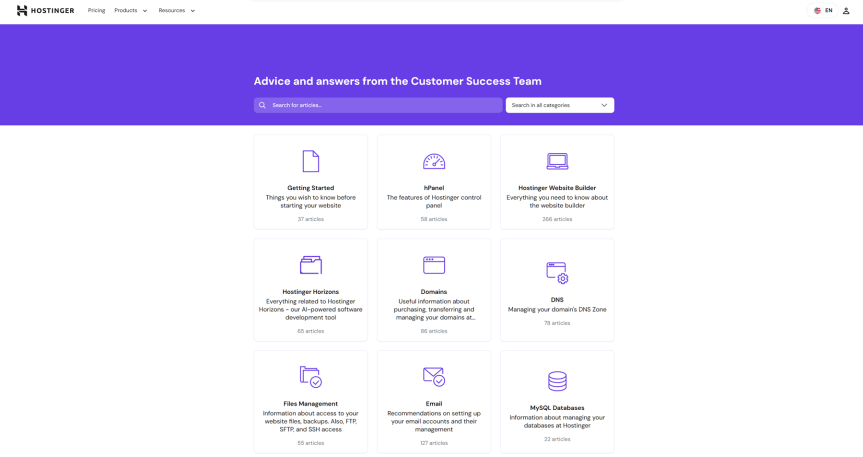
Hostinger’s knowledge base is difficult to find. I found a “Learning Lab” link in the account menu, but quickly realized this wasn’t the knowledge base — and the actual knowledge base was only accessible through a link in the footer of the public-facing site. This problem is as unusual as it is frustrating: None of the other hosts I’ve tested failed to include a knowledge base link in the account area.
Once I found it, however, the knowledge base proved extremely useful. There are extensive tutorials on every aspect of building your site, with a mix of beginner-friendly articles, image-based tutorials and videos. I was also impressed by the learning lab, which goes beyond the standard knowledge base fare with advanced guides on creating specific types of blogs, online stores and other websites.
Direct communication (email, live chat, phone, social media)
Hostinger offers 24/7 customer support through its AI bot, Kodee. Theoretically, Hostinger also provides 24/7 live chat support from human agents, but I never managed to speak to a person.
Unlike the knowledge base, Kodee’s easy to find — there’s a prominent box for asking questions on the account dashboard homepage, an “Ask AI” button in the top bar and a pop-up encouraging you to ask Kodee for help when you use the search function. Kodee’s well-trained, too, near-instantly pulling knowledge base answers to most simple questions.
Unfortunately, I had to ask to speak to a person twice before Kodee directed me to human support. My question was then “sent for human review,” and I received a boilerplate response about 5 minutes later. When I asked a follow-up question, Kodee responded. I was unable to convince the bot to let me have a proper conversation with a person, and the boilerplate text in my “human-reviewed” response made me wonder whether a human had really looked at my case.
Reputation
Hostinger has a Trustpilot ranking of 4.7 out of 5 based on an impressive 71,000 reviews, with the reviews themselves suggesting that most people enjoy Hostinger for the same reasons I did — intuitive site-building tools, excellent server management options and comprehensive tutorials. However, there are over 5,000 negative reviews, mostly citing the same issues I experienced with customer service. This suggests that Hostinger’s customer support is inconsistent.
Hostinger is a solid web host for most folks, but its sluggish server speeds and customer service issues may hold it back
Hostinger’s beginner-friendly website management tools and impressive long-term discounts make it an attractive choice for anyone seeking a simple hosting experience for a casual website like a for-fun blog or small businesses with a tight budget. Default server speed isn’t great, but you can improve it by enabling proprietary speed-boosting and optimization tools. Poor customer support may be off-putting for some people if they expect to need regular human-assisted troubleshooting. But the self-serve solutions are comprehensive, and those with simple websites may be unlikely to need regular direct support.
Hostinger offers excellent prices on its cloud hosting for more advanced websites, like e-commerce sites, large content sites and other bigger operations. However, its lack of human customer support means you may not be able to receive the help you need when running into more advanced issues — which can be majorly detrimental if you rely on your site for income. You may want to choose a competitor like SiteGround if you’re building a complex website or a website for a large business.


