
3D printing makes it incredibly rewarding to see a digital idea come to life and become something you can actually hold. From printing custom board game pieces to making small home repairs and accessories, 3D printing is easily one of the most satisfying, creative outlets around. Moreover, what’s surprising is just how accessible it’s become.
Our Picks
Bottom Line
Pros & Cons
- Simple setup
- Side mounted spools make the profile slim
- Removable top makes printing high temperature filaments easy
- No real app experience
- Waste management is still an issue
Bottom Line
Pros & Cons
- The best setup experience
- 4-color printing on a budget
- Good app experience
- Surprisingly fast
- No real modification path
- AMS Lite is wobbly
- Awkward shape and footprint
Bottom Line
Pros & Cons
- Great price for a CoreXY
- Great quality
- Slicer needs some work
Bottom Line
Pros & Cons
- Amazing price for a fast machine
- Excellent quality for a machine this cheap
- Small build area means printing in batches
Bottom Line
Pros & Cons
- Incredibly fast print speed
- A great size for any print job
- The new tilting lid is so helpful
- I can't think of a single complaint
You no longer need to spend a fortune to get reliable prints and impressive detail. Many budget-friendly 3D printers now deliver performance that rivals far more expensive models. Whether you want to sell custom items online, create personalized holiday gifts or simply experiment with something new, an affordable 3D printer can unlock a lot of creative freedom and become a productive side project. We’ve tested the top affordable options on the market, and these are our favorites.
What’s the best budget 3D printer?
Budget 3D printing is a growing category. For your money, the best you can buy is the Elegoo Centauri 2. Whether you’re using the Emoji or the standard version, you’re getting a great four-color 3D printer for under $400.
These budget 3D printers all cost under $500 (although prices can drift a bit from month to month), and some are better suited for beginners than others. Our list of picks for the best 3D printer overall covers a much wider range of choices, but these are excellent for getting started — or for buying several at once. If you’re thinking of creating a print farm, buying several Centauri 2‘s is an excellent way to get started.
Best budget 3D printers


James Bricknell/CNET
Best overall budget 3D printer
Elegoo Centauri 2
Pros & Cons
- Simple setup
- Side mounted spools make the profile slim
- Removable top makes printing high temperature filaments easy
- No real app experience
- Waste management is still an issue
Get it now
Expert Take
The original Centauri was one of my favorite budget 3D printers, and the addition of a four-color system makes this the best budget 3D printer available right now. Prints on the Centauri 2 are above average in quality for the price and offer consistent accuracy across the board. Elegoo now uses a forked version of OrcaSlicer as its software, so it is much improved from previous versions, though the app situation leaves a lot to be desired.
The Elegoo Centauri 2 is a great entry point to the hobby or a good purchase in bulk if you’re looking to start a print farm.
Specs & Configurations
- Material type
- Filament
- Build area (mm)
- 256x256x256
- Official max printing speed (mm/s)
- 500
- Dimensions (mm)
- 500×480×743
- Price
- $$

James Bricknell/CNET
Best color-ready fast 3D printer
Bambu Lab A1 Mini Combo
Pros & Cons
- The best setup experience
- 4-color printing on a budget
- Good app experience
- Surprisingly fast
- No real modification path
- AMS Lite is wobbly
- Awkward shape and footprint
Get it now
Expert Take
The A1 Mini Combo is an almost perfect entry to the world of color 3D printing. It’s well priced, and while the build area is small, the print quality and the fact that you can print in four colors straight out of the box is amazing. If you’re looking for your first printer and want to try color printing, this is a no-brainer. I’ve been using the Mini pretty much constantly since it arrived at my door, and if I want a print that doesn’t fail and looks amazing, this is the machine I use.
The only real downside to the A1 Mini is the print bed size. At 180mm x 180mm, it’s the smallest on this list — and yet, with the AMS color system attached, it takes up the most space of any 3D printer here. Remember that if you only have a small space to build your 3D printing workshop.
Specs & Configurations
- Material type
- Filament
- Build area (mm)
- 180x180x180
- Official max printing speed (mm/s)
- 500
- Dimensions (mm)
- 347×315×365
- Price
- $$

Flashforge / CNET
A great Carbon 2 alternative
Flashforge AD5X
Pros & Cons
- Great price for a CoreXY
- Great quality
- Slicer needs some work
Get it now
Expert Take
The AD5X is a great alternative to the Centauri 2 if you have a slightly smaller budget and don’t need the full enclosure. Most people won’t need a fully enclosed 3D printer to print PLA, so the savings are worth the time. The quality of the prints on the AD5X is excellent, and while the waste output is quite high, spending some time with the included slicer can yield some better results.
Specs & Configurations
- Material type
- Filament
- Build area (mm)
- 220x220x220
- Official max printing speed (mm/s)
- 600
- Dimensions (mm)
- 363x402x488
- Price
- $$
Best budget resin 3D printers
Most beginner printers use a plastic filament to create models, but plenty of affordable resin 3D printers are available, too. Liquid resin is a little more difficult to use than standard 3D printing material and requires safety equipment, but it also produces amazingly detailed results.

Elegoo
Best starter resin printer
Elegoo Mars 5
Pros & Cons
- Amazing price for a fast machine
- Excellent quality for a machine this cheap
- Small build area means printing in batches
Get it now
Expert Take
This small resin printer is a popular option from Elegoo’s Mars line. Because of the 4K monochrome LCD (these printers use light from an LCD to cure liquid resin), it can print much faster than older printers. Standard 3D printing simply can’t reproduce the level of detail on models. The Elegoo Mars 5 is the latest and greatest, and the price is now incredibly low. Lower than any filament-based machine on the market.
If you’re looking to make small batches of D&D minis or custom jewelry pieces for cosplay, then the Mars series is the right machine.
Specs & Configurations
- Material type
- Resin
- Build area (mm)
- 153 x 77 x 175 mm
- Official max printing speed (Layer time in seconds)
- 1.5 – 3
- Dimensions (mm)
- 227 x 227 x 439
- Price
- $

James Bricknell/CNET
Best midsize resin 3D printer
Elegoo Saturn 4
Pros & Cons
- Incredibly fast print speed
- A great size for any print job
- The new tilting lid is so helpful
- I can't think of a single complaint
Get it now
Expert Take
The Elegoo Saturn 4 is my favorite resin printer right now. It prints incredibly detailed models at a speed that is often astonishing. The bed size is much larger than the printers in the smaller category, while its footprint is much easier to deal with than other, larger printers. You can print finely detailed cosplay pieces or multiple tabletop miniatures with equal ease with the Saturn 4, making it perfect for a small business.
Specs & Configurations
- Material type
- Resin
- Build area (mm)
- 218x122x220
- Official max printing speed (mm/h)
- 70
- Printer dimensions (mm)
- 327x329x548
- Price
- $$
 James Bricknell/CNET
What to consider when buying a budget 3D printer
Materials
The material you will be using is an important factor in choosing which budget printer you should buy. If you are looking to use basic materials like PLA or PETG, then most printers will have no issues. If you want something like carbon fiber, you may need to look at a more expensive machine or upgrade parts of a cheaper one. I would recommend learning to print with PLA and PETG before trying out some of the other, more exotic filaments. I have a much more detailed article about filament you can use to help decide.
Build volume
The build volume of a printer is also important. The Bambu Lab A1 Mini is a fantastic printer but its build volume may be too small for someone looking to make cosplay armor or shelving brackets. Make sure you are thinking about what you want to make and how big the end result might be.
How we test 3D printers
 James Bricknell/CNET
Testing 3D printers is an in-depth process. Printers often don’t use the same materials, or even the same process to create models. I test SLA 3D printers that use resin and light to print, and FDM printers that melt plastic onto a plate. Each has a unique methodology. Core qualifiers I look at include:
- Hardware quality
- Ease of setup
- Bundled software
- Appearance and accuracy of prints
- Repairability
- Company and community support
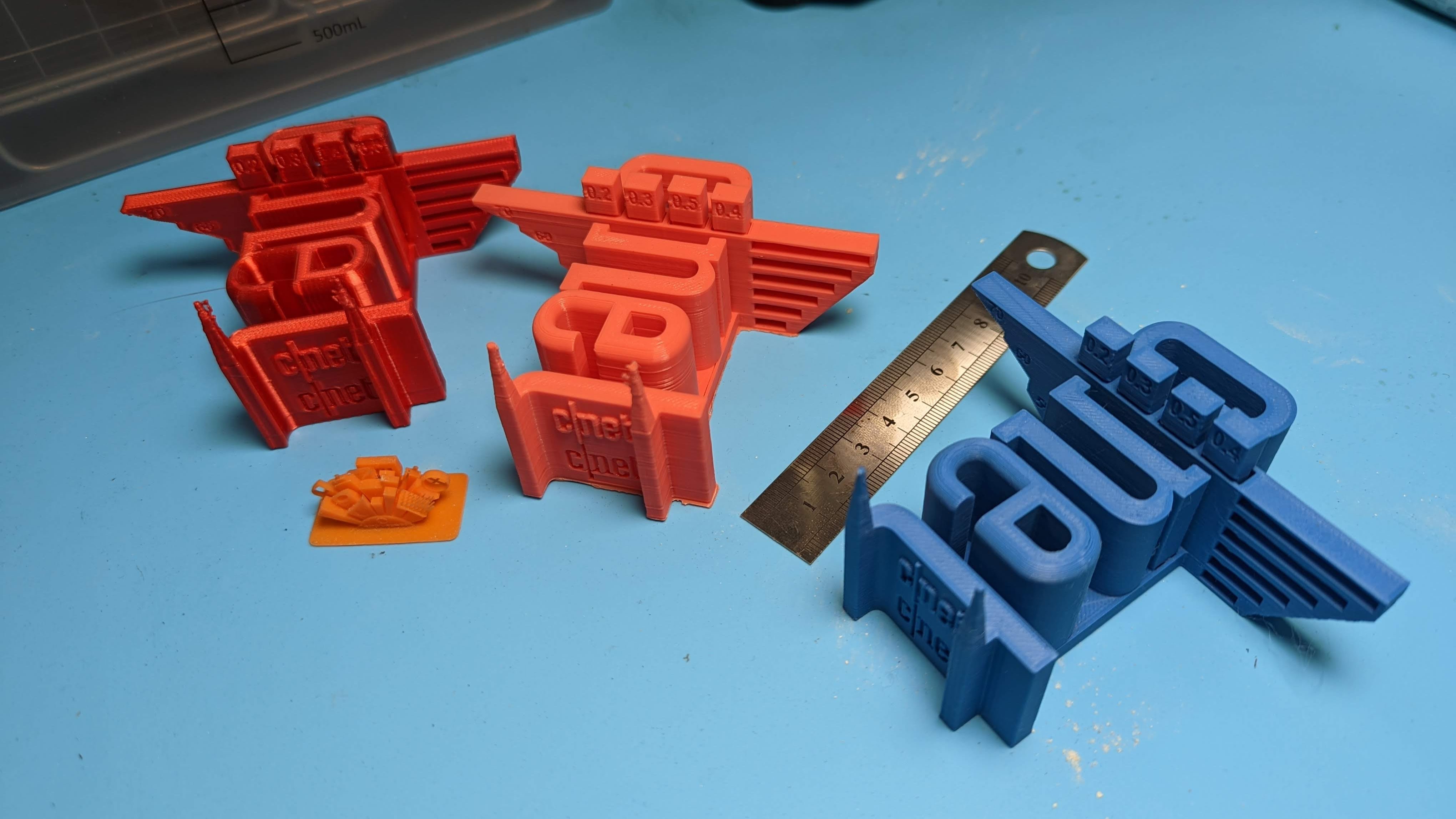
A key test print, representing the (now old) CNET logo, is used to assess how a printer bridges gaps, creates accurate shapes and deals with overhangs. It even has little towers to help measure how well the 3D printer deals with temperature ranges.
When testing print speed, we slice the model using the standard slicer the machine is shipped with on its standard settings, then compare the real-world duration of the print to the statement completion time on the slicer. 3D printers often use different slicers, and those slicers can vary wildly on what they believe the completion time to be.
We then use PrusaSlicer to determine how much material the print should use and divide that number by the real-world time it took to print to give us a more accurate number for the speed in millimeters per second (mm/s) the printer can run at.
 James Bricknell/CNET
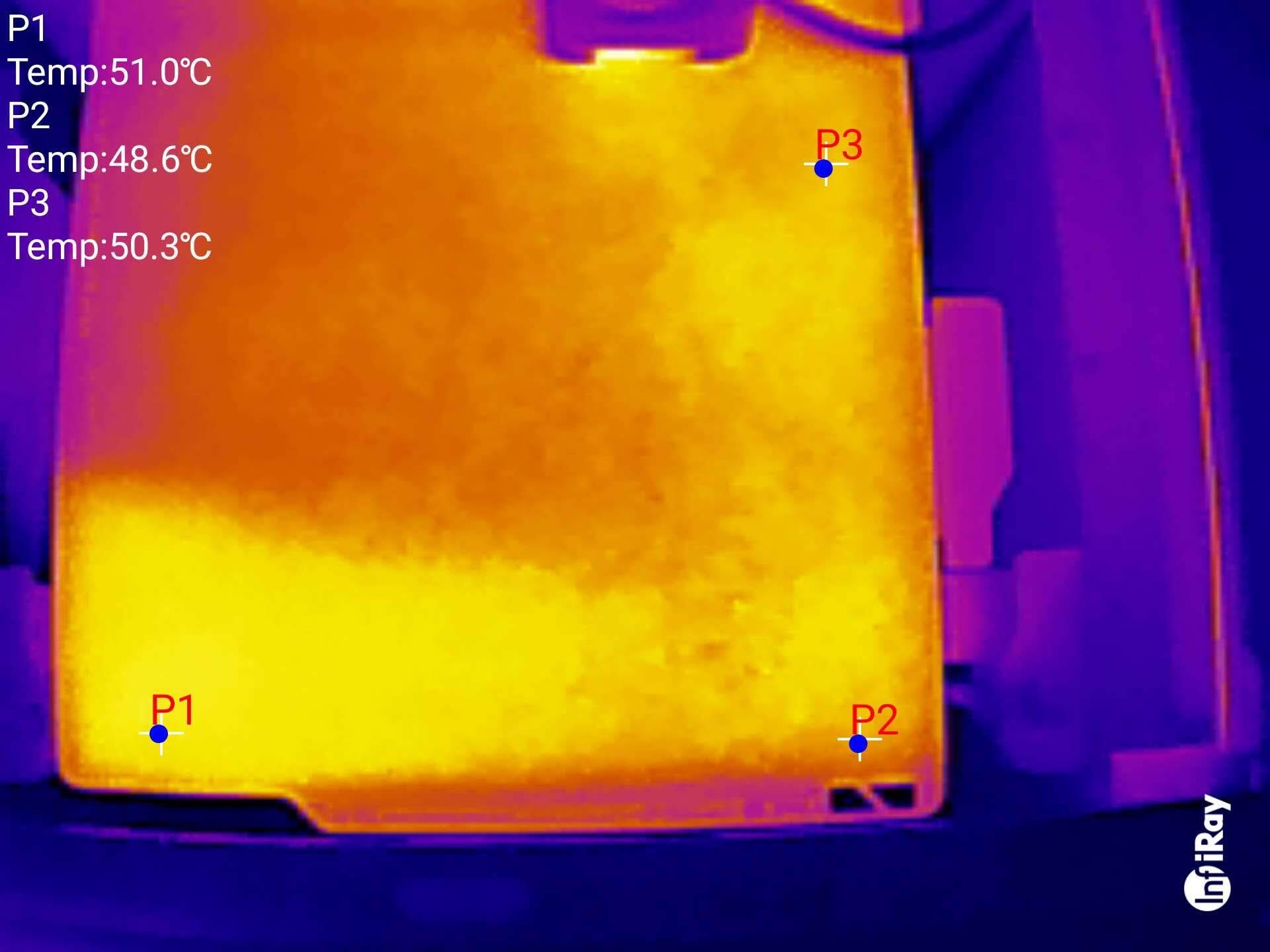
Every build plate is supposed to heat up to a certain temperature, so we use the InfiRay thermal imaging camera for Android to check how well they do. We set the build plate to 60 degrees Celsius — the most used temperature for build plates — waited 5 minutes for the temperature to stabilize, and then measured it in six separate locations. We then took the average temperature to see how close the 3D printer got to the advertised temperature.
Testing resin printers requires different criteria, so I use the Ameralabs standard test: printing out a small resin model that looks like a tiny town. This helps determine how accurate the printer is, how it deals with small parts and how well the UV exposure works at different points in the model.
Many other anecdotal test prints, using different 3D models, are also run on each printer to test the longevity of the parts and how well the machine copes with various shapes.
For the other criteria, I researched the company to see how well it responds to support queries from customers and how easy it is to order replacement parts and install them yourself. Kits (printers that come only semi-assembled) are judged by how long and difficult the assembly process is and how clear the instructions are.
Budget 3D printer FAQ
What material should I use to print with?
Most home 3D printers use PLA or ABS plastic. Professional printers can use all sorts of materials, from metal to organic filament. Some printers use a liquid resin, which is much more difficult to handle but offers sharper details. As a beginner, I recommend using PLA. It’s nontoxic, made mostly of cornstarch and sugarcane, handles easily and is inexpensive. It’s also more sensitive to heat, so don’t leave your 3D prints on the dashboard of a car on a hot day.
What settings should I use?
Most 3D printers include or link to recommended software, which can handle converting 3D STL or other files into formats supported by the printer. Stick with the suggested presets to start — with one exception. I’ve started adding a raft, or bottom layer of filament, to nearly everything I print. It has cut down dramatically on prints that don’t adhere to the bed properly, which is a common issue. If you continue to have problems, rub a standard glue stick on the print bed right before printing.
What are supports?
Your 3D models probably need some help to print properly, as these printers don’t do well with big overhangs — for example, an arm sticking out from a figure. Your 3D printer software can usually automatically calculate and add supports, meaning little stands that hold up all those protruding parts of the model. After the print finishes, clip the supports off with micro cutters and file down any nubs or rough edges with hobby files.
Is 3D printing difficult to learn?
3D modeling takes time to master. While the barrier to entry has gone down significantly, your biggest challenge with 3D printing will be to learn how to design the object that you want to print.
How long does it take to 3D print an object?
The time to 3D print an object can vary vastly from 30 minutes to multiple days. This largely depends on the size and complexity of the design as well as the material being used for printing. A higher quality print with a smoother finish will take longer to print.


